

What counts
Filling in a form doesn’t use AI actions; the application covers it. Adding a job, choosing a resume, setting a status and writing notes are free.
Job seeker plans
The Free plan’s allowances are given once and don’t refill. Paid allowances reset each billing month. The Search pass is three months of Pro paid up front, and it doesn’t renew.
You don’t need a card to start on Free.
Operator plans
For career coaches, recruiters and agencies who apply on behalf of clients. See Working with clients.
Yearly billing saves 20%. Allowances are one pool shared across all your clients, sized by the plan’s client seats. Each seat adds, every month:
- 40 applications, up to 8 a day
- 150 AI actions
- 20 job searches, up to 4 a day
Add more
Packs work on any plan and never expire.
Buy them under Add more → Other ways to add on the Plan & usage page.
The Plan & usage page
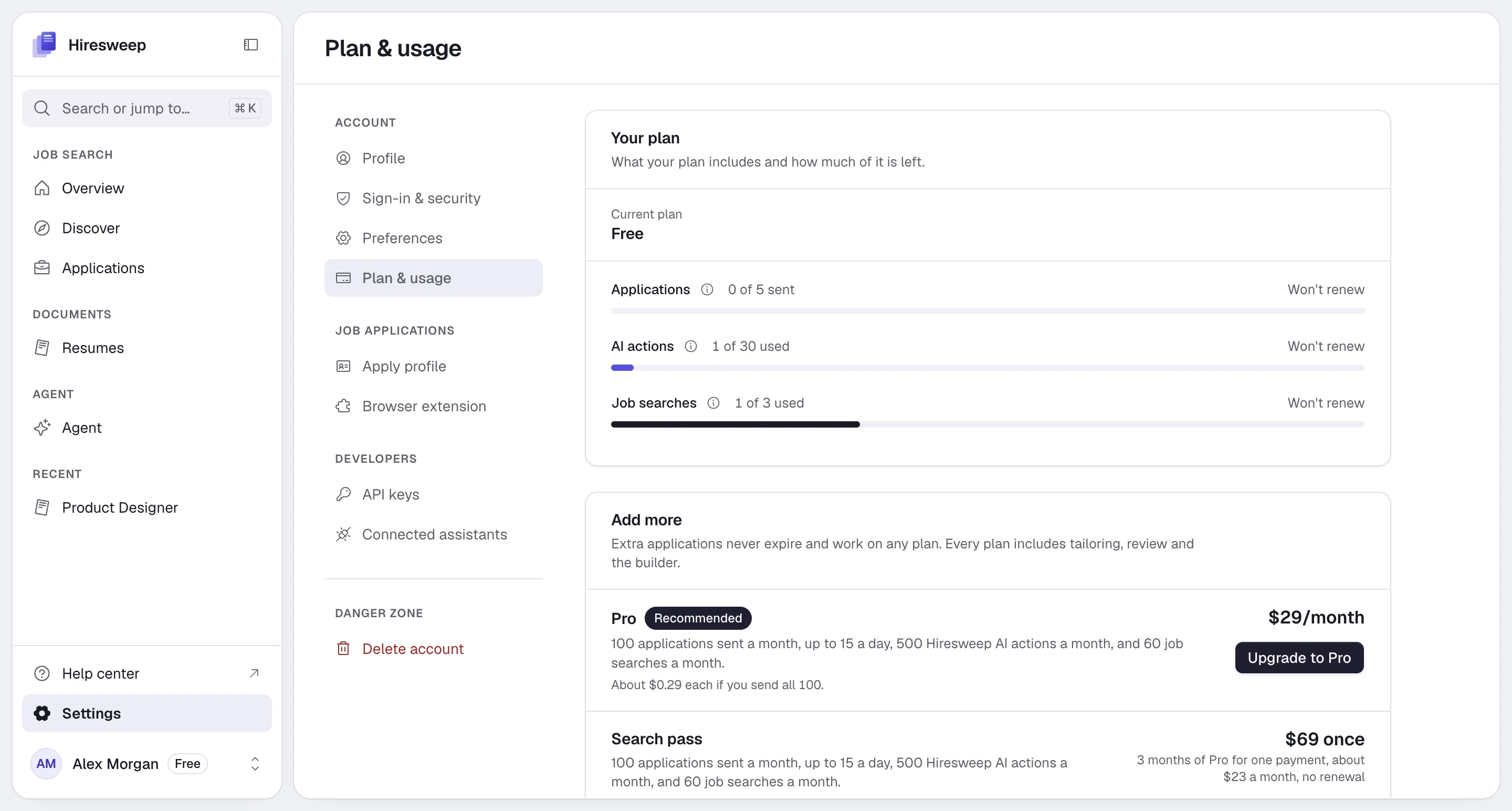
- The current plan, its price, and the date it renews or ends.
- A meter for Applications, AI actions and Job searches, each with how many you have used and when it resets.
- Your daily application limit, and for operator plans how many active clients the plan allows.
Upgrade, change or cancel
1
Upgrade or switch
On Plan & usage, select Upgrade to or Switch to next to a plan and pay at checkout. After payment you
return to Hiresweep with Payment received. Updating your plan… and the new allowances apply.
2
Manage billing
Select Manage billing to update your card, download invoices or cancel. It opens the billing portal of our
payment provider, Stripe.
When you run out
When an allowance is used up, the action that needs it stops and Hiresweep links to See plans:- Applications: you can’t start new application runs. Running ones that already hold an application can still finish.
- AI actions: AI features are disabled until the allowance resets or you upgrade. The agent’s composer shows how many actions you have left, and warns when five or fewer remain.
- Job searches: Search and repeating searches stop until the allowance resets. A skipped repeat costs nothing.
Developers
API and MCP requests that hit an allowance return HTTP402 with one of these error codes: APPLY_LIMIT_REACHED, AI_LIMIT_REACHED, DISCOVERY_LIMIT_REACHED or CLIENT_LIMIT_REACHED. See Using the API.