

You need a verified email address to start a search. If you have no resume yet, Discover shows Create a resume to
start finding jobs. See Creating your first resume.
How a search works
A search has three parts:
Nothing is searched until you have reviewed the Targets.
Start a search
1
Open the New search dialog
Select New search. The first time, select Start a search on the Find jobs that fit your resume card.
2
Pick a resume and how many titles to suggest
Choose the Resume to search for. Your most recently edited resume is preselected. Set Titles to suggest
between 3 and 10 (the default is 5).
3
Generate Targets
Select Generate Targets. Hiresweep reads your resume and suggests job titles with their keywords. This uses
one AI action.
4
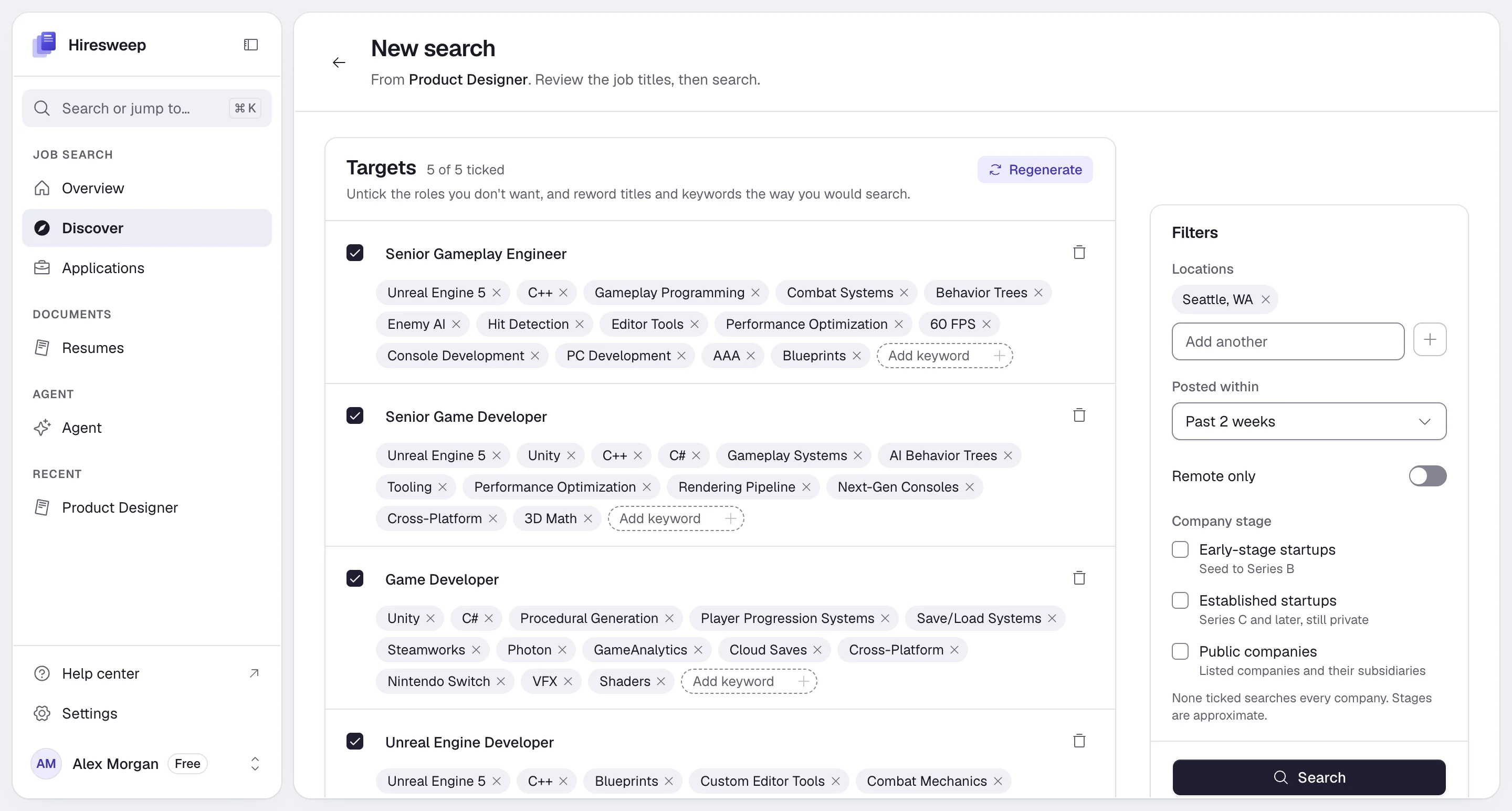
Review the Targets
Untick the roles you don’t want and reword titles and keywords the way you would search for them. See Edit
Targets.
5
Set the filters
Choose locations, how recent the postings should be, and the company stage. See Filters.
6
Search
Select Search. A search takes a few minutes. You can leave the page; the search keeps going and the jobs wait
for you on Discover.
Edit Targets
Each Target has a tick box, a title and a list of ATS keywords.- Untick a Target to leave it out of the search without deleting it.
- Edit the title, or use Add keyword to add a keyword. Remove a keyword or a whole Target with its remove button.
- Add a Target adds an empty one you fill in yourself.
- Regenerate replaces every Target with new suggestions. Hiresweep asks before it throws your edits away, and it uses another AI action.
Filters
up to 5
Cities, regions or countries to search in. Leave it empty to search anywhere. Hiresweep fills it in from your apply
profile, or from your resume when the profile has no location.
default: Past 2 weeks
Past 24 hours, Past 3 days, Past week, Past 2 weeks or Past month.
default: off
Shows remote jobs open to people in your locations’ countries, wherever the company is based.
default: all
Early-stage startups (Seed to Series B), Established startups (Series C and later, still private) and
Public companies (listed companies and their subsidiaries). Leave all unticked to search every company. Stages
are approximate, and picking any stage limits the search to the company directory described below.
Where Hiresweep searches
Hiresweep reads only public job boards whose terms allow automated access. LinkedIn and Indeed are never searched.Company job boards
Company job boards
Careers pages hosted on Greenhouse, Lever, Ashby, Workday, SmartRecruiters, Workable, Recruitee, Personio,
Rippling, Gem, BambooHR, Breezy HR, Pinpoint, Teamtailor, JazzHR, Jobvite, Homerun, Trakstar Hire, Polymer, Comeet
and HiBob. Hiresweep searches a curated directory of about 2,500 companies on these boards.
Job sites
Job sites
Remote OK, We Work Remotely, Himalayas, Jobicy and Arbeitnow.
Job search APIs
Job search APIs
Adzuna and USAJOBS. Only the Target title and location are sent to them, nothing else about you.
While the search runs
Discover shows Searching companies’ job boards… with how many jobs it has found so far and the latest steps of the search. If a board refuses the search or returns only some of its jobs, it is listed (for example, Workday showed only part of its results), and the other boards carry on.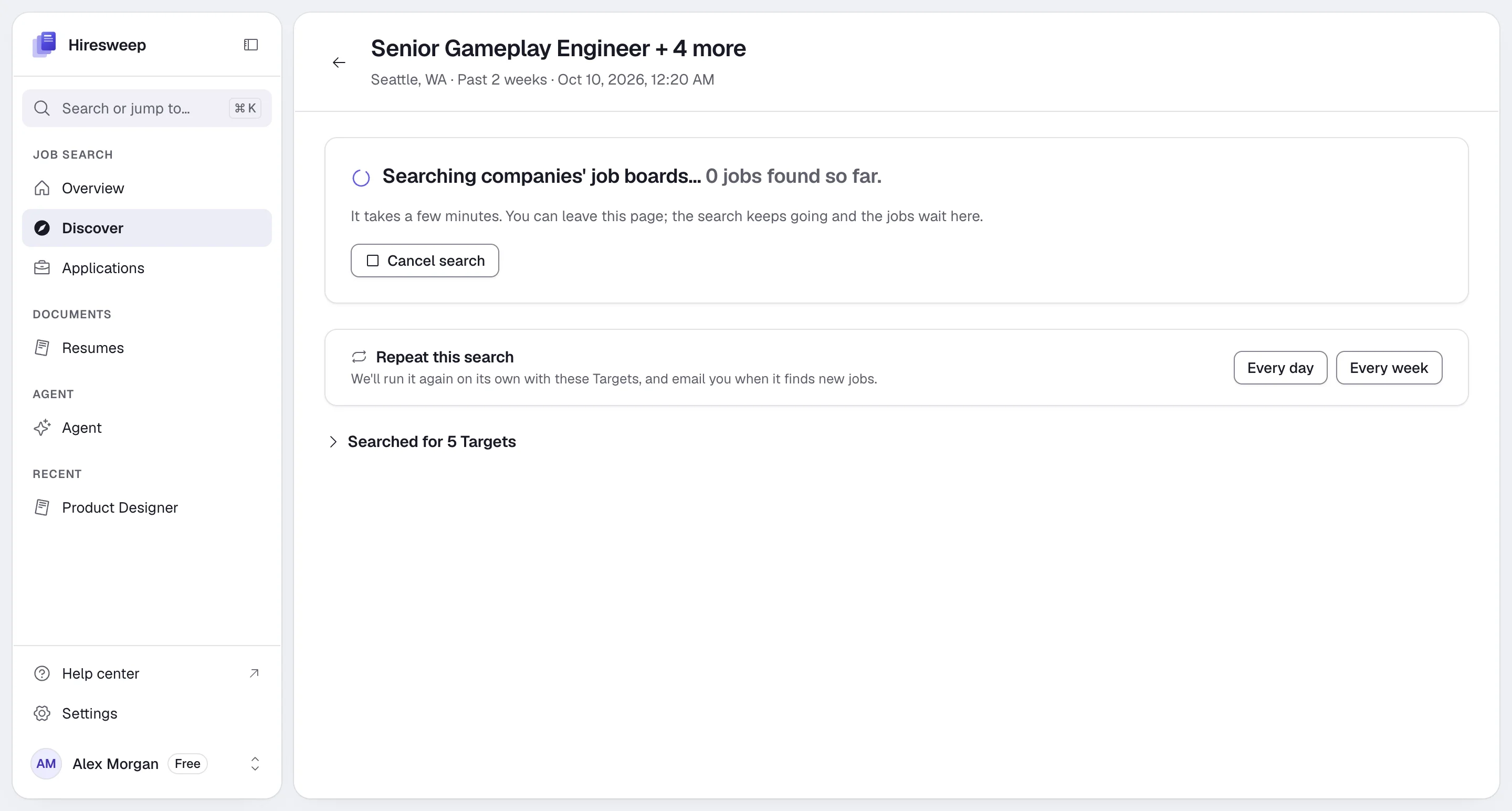
- N jobs found: the matches are ready to review below. Searched for N Targets shows the Targets, filters and the boards that returned jobs.
- No jobs found: nothing matched your Targets and filters. Widen the location, turn off Remote only, choose a longer Posted within, or try different Targets. Where it searched lists the boards it tried.
- Search cancelled, or Cancelled after N jobs: you stopped it. Jobs found before that are kept.
- The search stopped early: something went wrong. The jobs found so far are kept.
Review your matches
Each match shows the job title, the company, the location and how closely it fits.Match strength
The score compares the job with your Target without AI: most of it comes from how closely the job title matches the Target’s title, and the rest from the Target’s keywords found in the job’s title and description. Hover the label to see the exact score. The full review against your resume happens later, when you add the job and open it.
Select Explain fit to have Hiresweep write a one-sentence reason for each undecided job on the page (up to 20 jobs). A sparkle icon appears next to each job title; hover or tap it to read the reason. This uses one AI action per page.
Filter and sort
- Show (in List view): To decide and added, Dismissed, Expired or All jobs.
- Board and Target: limit the list to one source or one Target. They appear when the matches come from more than one board or Target.
- Sort by: Closest match, Newest or Company.
- View: List shows every match in a table. One at a time shows one job per screen. Phones open in One at a time.
Decide on each job
In One at a time view, press A to add, D to dismiss and S for later.
To act on several jobs, tick their rows and select Add jobs or Dismiss.
A job you already track shows Already tracking (Tracked on phones), with an arrow button that opens the application.
A match you don’t decide on expires after 30 days. Later searches for the same resume skip the jobs you already
added or dismissed. Jobs you left undecided can turn up again.
Search again
When a search has finished, select Search again with these Targets. Hiresweep creates a new draft with the same Targets and filters; adjust it if you like and select Search. To run it on its own, use Repeat this search. Earlier searches on Discover’s front page lists your searches. Unfinished ones carry a status badge (Draft, Searching, Failed or Cancelled), and runs started by a repeating search are marked Scheduled. To delete a search, hover its row and select the trash icon. Its matches are deleted with it, but applications you created from them stay.What it costs
Your plan also limits how many searches you can run per day and at the same time, and only one search per resume can run at once. See Plans and usage.
Troubleshooting
Search is greyed out
Search is greyed out
Tick at least one Target. If the page says Searching job boards isn’t set up on this server, job search is not
available on this Hiresweep server.
A search for this resume is already running
A search for this resume is already running
Only one search per resume can run at a time. Wait for it to finish, or cancel it.
A plan notice appears above the search
A plan notice appears above the search
Your plan doesn’t include job search, you have used its job searches or today’s limit, or another search is still
running. Select See plans to compare plans, or wait for the other search to finish.
Too few matches
Too few matches
Add more Targets, use broader keywords, add locations, widen Posted within, or clear Company stage.