# Creating your first resume
> Start a resume in Hiresweep from a file, with the agent, or from a blank page, and open it in the builder.
Everything in Hiresweep starts from a resume: fit checks, tailoring and applying all read it. You can bring in the resume you already have, let the agent write a first version, or start from a blank page.
## Choose how to start
Open **Resumes** in the dashboard sidebar and select **New**. The menu has three options:
| Option | What it does |
| --- | --- |
| **Import PDF or Word** | Reads the resume you already have into Hiresweep. See [Importing resumes](https://docs.hiresweep.com/guides/importing-resumes). |
| **Draft with the agent** | Opens a chat where the agent asks about your experience and writes a first version. See [Using the AI agent](https://docs.hiresweep.com/guides/using-ai-agent). |
| **Start blank** | Creates an empty resume you fill in yourself. |
The same three options appear on the **Bring in your resume** screen when your library is empty, on the **Start another resume** tile in grid view, and in the command palette (⌘ K or Ctrl K).
**Draft with the agent** and PDF or Word imports use hosted AI and count against your plan's AI actions. See [Plans
and usage](https://docs.hiresweep.com/guides/plans-and-usage).
## Start a blank resume
Select **New**, then **Start blank**.
Enter a **Name**, up to 64 characters. A general name such as "Product designer" works, or name it after the role you are applying for. Select the magic wand to generate a random name.
Select **More options** to see **Slug** and **Tags**. The slug is filled in from the name and becomes part of the public link if you share the resume: `https://hiresweep.com/{username}/{slug}`. Each slug must be unique among your resumes. Tags help you filter the library later.
Select **Create**. To start with example content instead, open the menu next to **Create** and choose **Create a Sample Resume**.
The new resume opens in the builder straight away. It uses the Ridge template on A4 paper, and its resume language matches the language you use Hiresweep in. You can change all three in the **Design** tab.
A sample resume is a quick way to try templates, layouts and exports before you type your own details.
## What you see in the builder
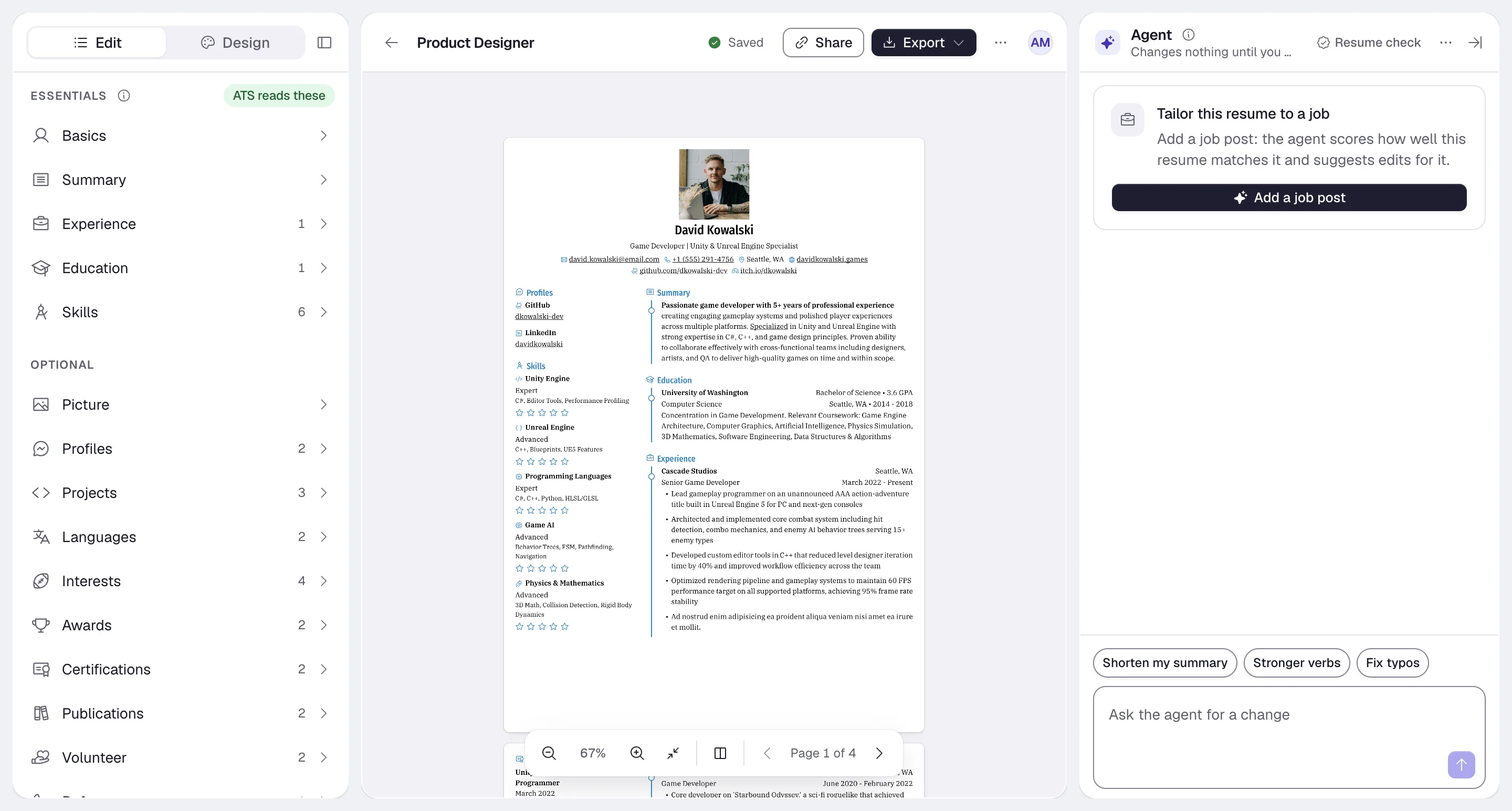
| Area | What it holds |
| --- | --- |
| **Edit panel** (left) | The **Edit** tab for your content and the **Design** tab for template, layout, fonts, colors, page and sharing. |
| **Canvas** (middle) | A live preview of the resume, with **Share**, **Export** and the **Resume actions** menu above it and the [canvas dock](https://docs.hiresweep.com/guides/using-the-builder-dock) below it. |
| **Agent** (right) | The AI agent, which can suggest edits and tailor the resume to a job. See [Using AI in the builder](https://docs.hiresweep.com/guides/using-ai-in-the-builder). |
Changes save automatically. The chip next to the resume name shows **Saving…** and then **Saved**. Press ⌘ S or Ctrl S to save right away.
On a phone, the builder shows one area at a time, with **Agent**, **Resume**, **Edit** and **Design** tabs at the bottom.
## Next steps
- Fill in your content: [Editing resume sections](https://docs.hiresweep.com/guides/editing-resume-sections)
- Pick a look: [Choosing a template](https://docs.hiresweep.com/guides/choosing-a-template) and [Designing your resume](https://docs.hiresweep.com/guides/designing-your-resume)
- Get a file: [Exporting your resume](https://docs.hiresweep.com/guides/exporting-your-resume)
- Keep several versions organized: [Managing resumes from the dashboard](https://docs.hiresweep.com/guides/managing-resumes-from-the-dashboard)